


PROJECT GOALS
2. User Interviews
Key insights
– Outdated or inconvenient data-management systems with no integration of video and photos into reporting workflowS
– Lack of standardized reporting formats, making cross-institutional data exchange difficult
– Minimal automation of routine tasks such as report completion
– Difficulty spotting early or subtle pathologies - especially for less experienced doctors
– Risk of overconfidence among experienced physicians, leading to missed findings
– Documentation consumes 30–50% of the workflow
– Tight schedules in public institutions leave little room for detailed reviews
– Few opportunities for collaboration or mentorship
– No built-in tools for double-checking diagnoses
UX Opportunities Discovered
Primary Feature — Real-Time ai aNOMALY Highlighting
Immediate AI-driven detection of suspicious areas in the video feed with clear location markers and probability scores. This allows physicians to confirm or dismiss findings on the spot, reducing missed pathologies and supporting less experienced practitioners.
Supporting Enhancements
Differential diagnosis suggestions to guide attention without overriding clinical judgment
AI-assisted report generation linked to anatomical landmarks and visual references
Minimal, integrated UI designed to work seamlessly during examinations without adding cognitive load
3. Competitor
& Cross-Industry Analysis
With no direct competitors offering a complete examination–documentation workflow, I analyzed both adjacent medical AI tools and unrelated industries with similar interaction patterns.
Sources of Inspiration
Medical AI tools
GI Genius (Medtronic), AI solutions from Olympus and Fujifilm: advanced anomaly overlays and probability scoring.
Video editing software
Premiere Pro, Veed.io: timeline-based navigation, split-view comparison, and marker systems for quick content review.
Gaps Found in Existing Medical Tools
– Non-friendly UI – too complex, rigid, and intimidating for new users
Fragmented workflows – detection tools often stop at marking anomalies, requiring doctors to manually transfer images and notes into separate reporting systems
Limited flexibility – few options to review and adjust AI findings within the same environment
Conclusion
The opportunity lies in merging both strengths: clinical-grade AI detection with the complex, yet proven by many years of work, navigation and review mechanics of video editing tools.
The result will be a platform that feels familiar, fast, and precise, while meeting the strict demands of medical practice.
4.User Flows
Based on interview insights and research, I mapped out key user flows to cover the most common tasks for gastroenterologists.
New Patient Examination FLOW
The most common flow: starting a procedure for a new or returning patient. The system minimizes preparation time by combining patient lookup, exam type selection, and AI-assisted examination into a single streamlined sequence.
– Quick patient search or creation in the database
– AI-analysis of live exam or uploaded footage
– Automatic anomaly snapshots and timeline markers accelerate reporting
Reviewing Patient History FLOW
this flow provides doctors with instant access to a patient’s full medical journey.
– Patient profile shows demographics, medical notes, and full exam history
– You can see which physicians performed each exam and when, with links to reports and recordings
– Built for follow-ups and easy management
Reviewing & Editing Medical Reports FLOW
A workflow optimized for quality control. Doctors or supervisors can quickly revisit recent procedures, validate AI suggestions, and edit reports — ensuring accuracy without slowing down the clinical pace.
– Exam Logs are optimized for recent-exam checks or date-driven lookup (when you search by day/time rather than by patient)
– Open a report or recording, review AI-suggested findings, and make manual adjustments
– Ensures medical accuracy while keeping the workflow fast and predictable
5.UX Solutions
& Wireframes
DASHBOARD
Problem:
Doctors start their work with very different goals: some begin an exam, others add a patient, others review a report.
Solution:
One entry hub with shortcuts to New exam, New patient, and Patient card, plus recent searches and system status to speed up most common tasks

EXAM SCREEN
Problem:
Doctors relied on manual screenshots and post-procedure video reviews,
which made examinations slow, error-prone, and disconnected from patient
registration. Critical findings were often hard to retrieve and link to reports.
Solution:
The exam screen unifies patient selection, exam type choice, and AI assistance
in one place. The system automatically generates labeled snapshots, maps them
to a timeline, and organizes them in a sidebar, allowing physicians
to review and report findings within minutes instead of hours.

REPORT SCREEN
Problem:
Report creation used to take 15–20 minutes.
Doctors had to manually insert screenshots, describe anomalies, and structure
findings themselves, which made the process repetitive and tiresome
Solution:
Built-in templates and automatic snapshot import from the Exam Screen aims to reduce the workload dramatically.

PATIENTS & PATIENT CARD SCREENS
Problem:
Patient information was scattered across multiple disconnected systems, which forced doctors to constantly switch contexts and manually compile a complete picture of a patient’s history. This slowed down examinations and made follow-ups unnecessarily complex.
Solution:
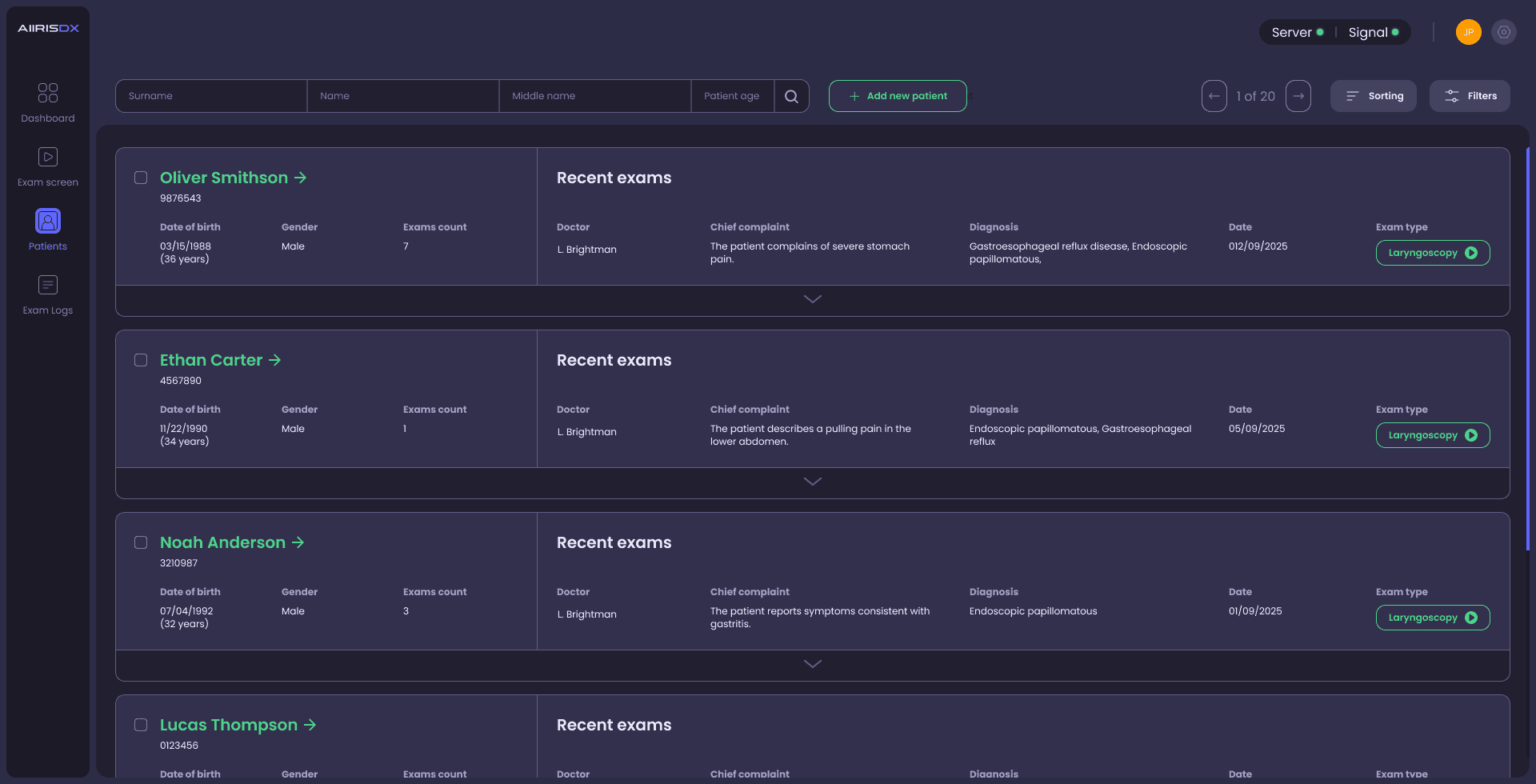
A centralized patient list with advanced filters allows quick search and access. Each unified patient card brings together demographics, medical history, exam records, and responsible doctors — all in one place, with the ability to open past reports or start a new exam instantly.


EXAM LOGS
Problem:
Doctors or administrators often need to locate a specific exam not by patient, but by date, procedure type, or responsible physician. Existing systems make this difficult — logs are buried in databases or separated from patient records.
Solution:
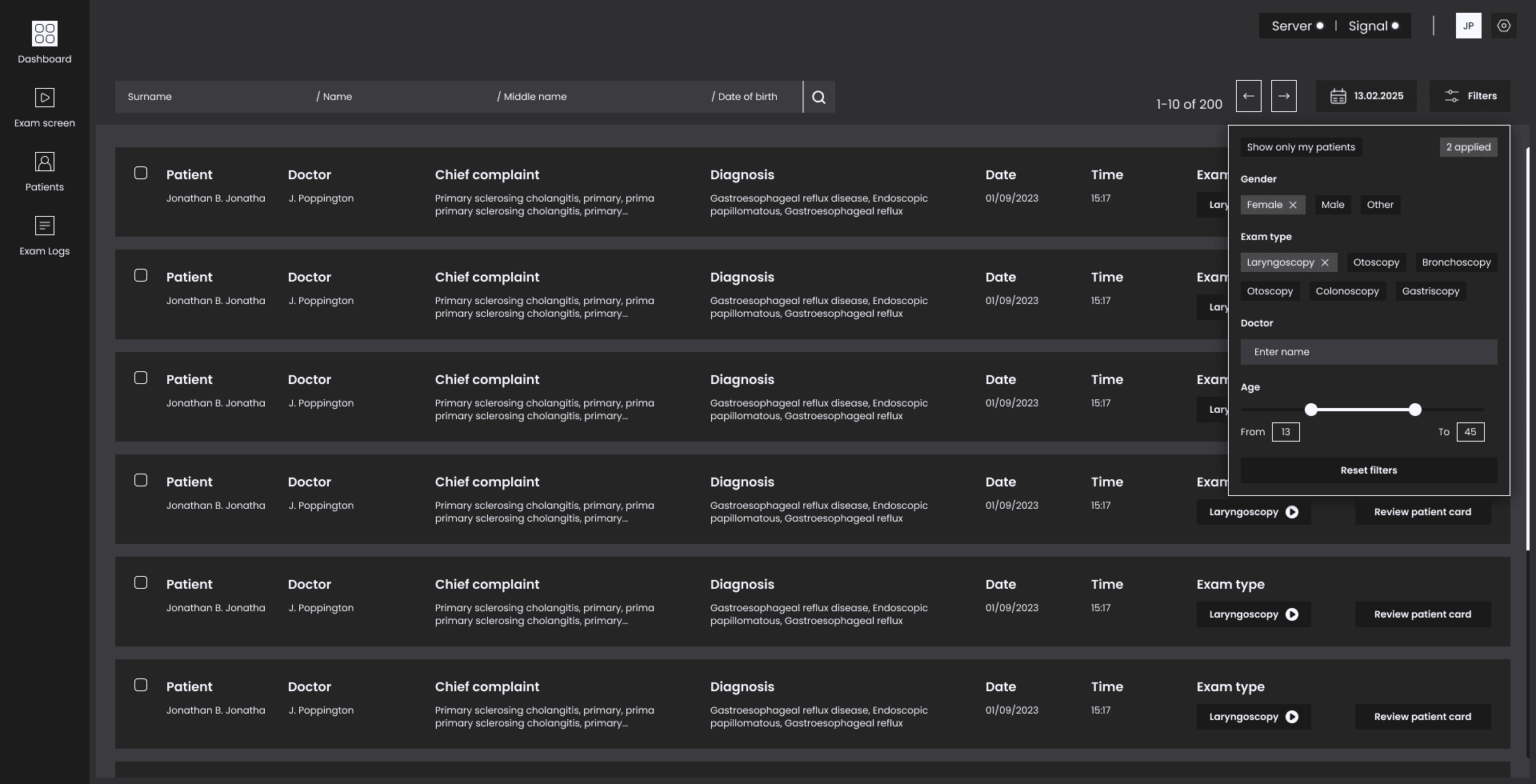
A centralized chronological log with advanced filters makes reviews fast. Each entry shows key context (complaint, diagnosis, physician) and links directly to reports or patient cards for audit.
Dashboard
A calm entry point into the system
The dashboard greets doctors with a clean, distraction-free start screen. It offers shortcuts to the most used actions, along with a universal search bar for quick patient lookup.

Exam Screen
Clarity during the most critical moments
The exam interface balances real-time AI overlays with an uncluttered video feed. Snapshots, timeline markers, and side annotations are visible yet never distract from the live procedure.
The whole ui dark theme was chosen specifically because of this most crucial screen - to reduce eye strain during prolonged focus.
Report generator
From raw data to export-ready documents
Reports are generated in just a few minutes, but the emphasis here is on structure and readability. Templates, aligned typography, and clean sectioning ensure every report meets clinical standards.

Patients
& Patient Card
Readable structure for complex histories
The patient list was designed for fast scanning: bold identifiers on the left, expandable exam details on the right. Cards combine demographic data, exam results, and responsible physicians in a consistent layout.
The visual rhythm — alternating weights, alignment, and white space — helps doctors parse long lists without fatigue.

Exam Logs
An archive that feels lightweight
Even though logs may contain hundreds of entries, the interface doesn’t overwhelm. Neutral colors, pill-shaped filters, and grouped metadata make it easy to follow. The table was balanced between density and clarity: enough rows per screen to give overview, but with spacing that preserves readability.

BONUS
Alongside the application itself, I also created the brand identity and supporting materials to make AIIRISDX visible, memorable, and easy to understand for different audiences
Logo
A clean visual mark designed to work across medical UI, printed reports, investor decks, and digital platforms. It communicates trust, precision, and modernity without overwhelming the product itself


Landing Page
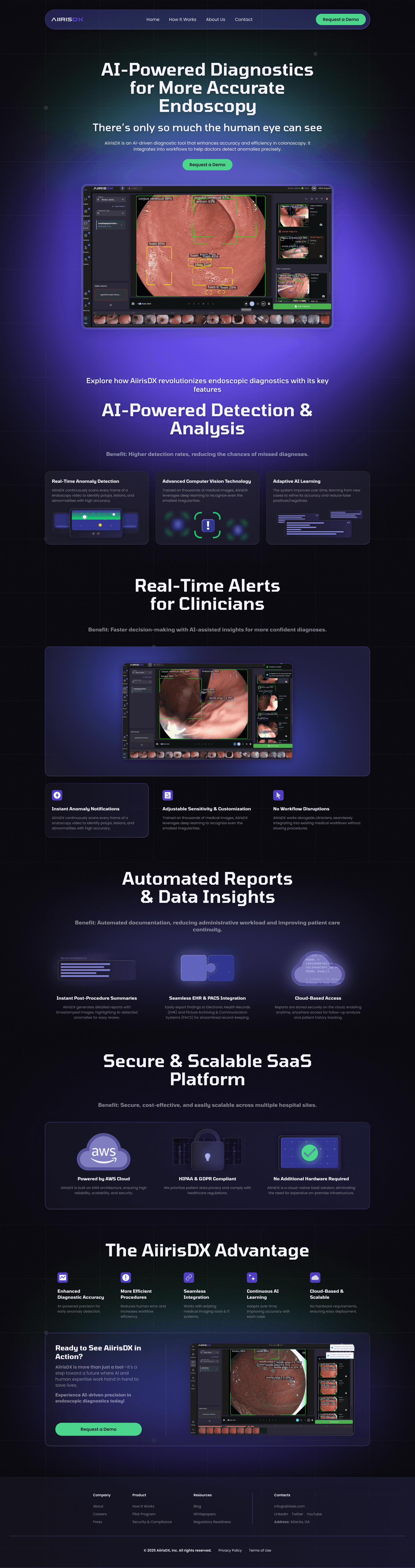
A concise one-pager designed to highlight workflow efficiency and immediate clinical benefits. Built to convert interest into adoption with a simple, direct structure.

Explainer
& Teaser Videos
Short, engaging videos created for conferences, social media, and onboarding.
They translate technical AI workflows into clear, visual stories — making the value of the product instantly understandable
Website
A broader corporate site aimed at investors, partners, and press. It presents the company vision, case studies, and product roadmap, positioning AIIRISDX as a credible and innovative leader in medical AI